

Graphical interfaces allow users to issue commands using pull-down menus, icon toolbars, and keyboard shortcuts. Menus and icon toolbars are easier to learn, whereas keyboard shortcuts are more ef...
Satisficing and the Use of Keyboard Shortcuts: Being Good Enough Is Enough?
Keyboard shortcuts are generally accepted as the most efficient method for issuing commands, but previous research has suggested that many people do not use them. In this study we investigate the use of keyboard shortcuts further and explore reasons why they are underutilized by users. In Experiment 1, we establish two baseline findings: (1) people infrequently use keyboard shortcuts and (2) lack of knowledge of keyboard shortcuts cannot fully account for the low frequency of use. In Experiments 2 and 3, we furthermore establish that (3) even when put under time pressure users often fail to select those methods they themselves believe to be fastest and (4) the frequency of use of keyboard shortcuts can be increased by a tool that assists users learning keyboard shortcuts. We discuss how the theoretical notion of ‘satisficing’, adopted from economic and cognitive theory, can explain our results.
Keyboard Shortcut Usage: The Roles of Social Factors and Computer Experience
Previous research (Lane, Napier, Peres, & Sándor, in press) has shown that despite the fact that it typically takes half as much time to issue a command to a computer application using that command's keyboard shortcut, most people issue a particular command by clicking an icon on a toolbar or by selecting the command from a pull-down menu. This study examined reasons why that might be the case with a web survey that focused on demographic characteristics of people who do and do not use keyboard shortcuts, as well as social factors of computer use that might influence use of keyboard shortcuts. Participants' shortcut usage was influenced by social factors, such as working in an environment with other shortcut users and experiential factors, primarily the hours spent using a computer per week.

Learning From Terminals to Design the Future of User Interfaces
How we overvalue the wrong technology and novel aspects of interface design at the expense of substantial gains to our productivity.
Towards a Better GUI Programming Benchmark | HackerNoon
GUI <a href="https://hackernoon.com/tagged/programming" target="_blank">programming</a> is <a href="https://medium.com/@eugenkiss/challenges-in-gui-programming-65d360466e3f" target="_blank">challenging</a>. We strive to find better ways to program GUIs and we do make progress. The fact that countless GUI toolkits with different ways to develop GUIs exist indicates that the road ahead is still long. If only there was a benchmark to compare GUI programs with one another. Then identifying good ideas would become much easier.
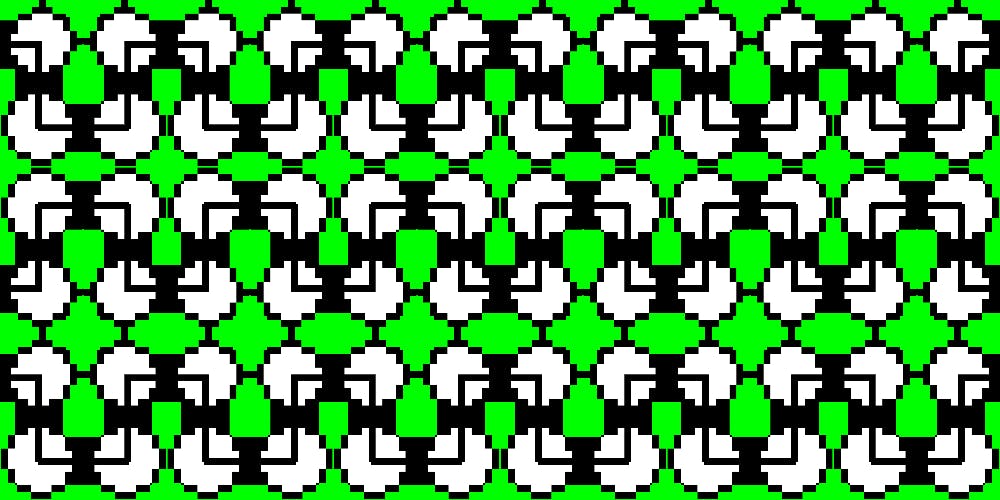
Invisible details - Building contextual menus - Linear
We recently added contextual menus to Linear. This makes the app faster and easier to use for people who prefer their mouse. One small thing that you won’t see or think about but will hopefully feel is a detail we designed into how sub-menus work.
History of The Graphical User Interface (GUI): A Wonderful Curse
How AI Tools Differ from Human Tools
Why the mental models we've built for human interfaces don't work for AI, & how Anthropic's latest guidelines are reshaping tool design for better performance & efficiency.
Our interfaces have lost their senses
We programmed them by punching cards, plugging in wires, and flipping switches. Programmers walked among banks of switches and cables, physically choreographing their logic. Being on a computer used to be a full-body experience.
Keyboard shortcuts
Learn more about keyboard shortcuts in Lightroom on the web to enhance your workflow.
What Makes Godot Engine Great for Advance GUI Applications
I have been trying out the Godot Game Engine lately, and I have been mightily impressed with what I see.

10/GUI
Here it is: my crazy summer project to reinvent desktop human-computer interaction. This video examines the benefits and limitations inherent in current mouse-based and window-oriented interfaces, the problems facing other potential solutions, and visualizes my proposal for a completely new way of interacting with desktop computers. There's more information at http://10gui.com .
Prefab: implementing advanced behaviors using pixel-based reverse engineering of interface structure
The rigidity and fragmentation of GUI toolkits are fundamentally limiting the progress and impact of interaction research. Pixel-based methods offer unique potential for addressing these challenges independent of the implementation of any particular ...

GUIdebook: Graphical User Interface gallery
GUIdebook: Graphical User Interface gallery
How an accessibility designer adds keyboard shortcuts to a web app
Keyboard shortcuts occupy a strange area for web design.
Desktop Neo – rethinking the desktop interface for productivity.
The desktop computer hasn’t changed much in the last 30 years. It’s still built on windows, folders and mouse input. But we have changed. We now use smartphones and tablets most of the time, since they are much easier to use.The traditional desktop computer is struggling to adapt the simple interfaces of mobile devices while also keeping its focus on productivity. With people switching to mobile devices for mundane tasks, we have the opportunity to rethink the desktop computer with a focus on getting professional work done.
