

Our browser is still missing the key insight of hypertext: documents linked together by hyperlinks. It lets us watch the waves, but not surf the web. So in this chapter, we’ll implement hyperlinks, an address bar, and the rest of the browser interface—the part of the browser that decides which page we are looking at.
Making Content Accessible | Web Browser Engineering
So far, we’ve focused on making the browser an effective platform for developing web applications. But ultimately, the browser is a user agent. That means it should assist the user in whatever way it can to access and use web applications. Browsers therefore offer a range of accessibility features that take advantage of declarative UI and the flexibility of HTML and CSS to make it possible to interact with web pages by touch, keyboard, or voice.
Automation and customization of rendered web pages
The names of commands and objects are vital to the usability of a programming system. We are developing a web automation system in which users need to identify web page elements, such as hyperlinks and form fields, in pages written by other designers. ...
Hypermedia Systems
The revolutionary ideas that empowered the Web. A simpler approach to building applications on the Web and beyond with htmx and Hyperview. Enhancing web applications without using SPA frameworks.
Context engineering is sleeping on the humble hyperlink
The dream of hypermedia can come to fruition in a world where clients can not only parse, but navigate with intent.
Protocol Handler Registration via Browser Extensions – make everything intensely
Custom URL schemes have traditionally served as an integration bridge between the browser and external capabilities. Schemes such as mailto: and tel: allow navigation to trigger actions beyond ordinary HTTP resource retrieval. The HTML Standard formalizes this mechanism through the Custom Scheme Handlers API, which enables websites to register themselves as handlers for specific URL schemes.
Supporting Embedded Content | Web Browser Engineering
While our browser can render complex styles, visual effects, and animations, all of those apply basically just to text. Yet web pages contain a variety of non-text embedded content, from images to other web pages. Support for embedded content has powerful implications for browser architecture, performance, security, and open information access, and has played a key role throughout the web’s history.
dietrich (@burrito.space)
A lot of Peek is window manager-y fun things, but with web pages, eg this design detail: - global hotkey -> cmd bar, doesn't take app focus - opening a URL there *does* take app focus, but *only* for the new/matching window, doesn't bring the rest along You get the page, but it *feels* in-place.

Constraint Browsers - thinking about mini browsers to keep you focused
Running Interactive Scripts | Web Browser Engineering
The first web applications were like the previous chapter’s guest book, with the server generating new web pages for every user action. But in the early 2000s, JavaScript-enhanced web applications, which can update pages dynamically and respond immediately to user actions, took their place. Let’s add support for this key web technology to our browser.
Web Browser Engineering
Web browsers are ubiquitous, but how do they work? This book explains, building a basic but complete web browser, from networking to JavaScript, in a couple thousand lines of Python.
Freeing the Web from the Browser | reinterpretcast.com
The Web is, without a doubt, the most powerful research tool currently available to man. No longer must researchers comb through endless indices and catalogues to find what they are looking for. Instead, hyperlinks allow users to associatively explore rich interconnected structures of information with ease. In just a few clicks, it is possible to navigate through a vast global space of information comprising documents on virtually any subject.
Downloading Web Pages | Web Browser Engineering
A web browser displays information identified by a URL. And the first step is to use that URL to connect to and download information from a server somewhere on the internet.
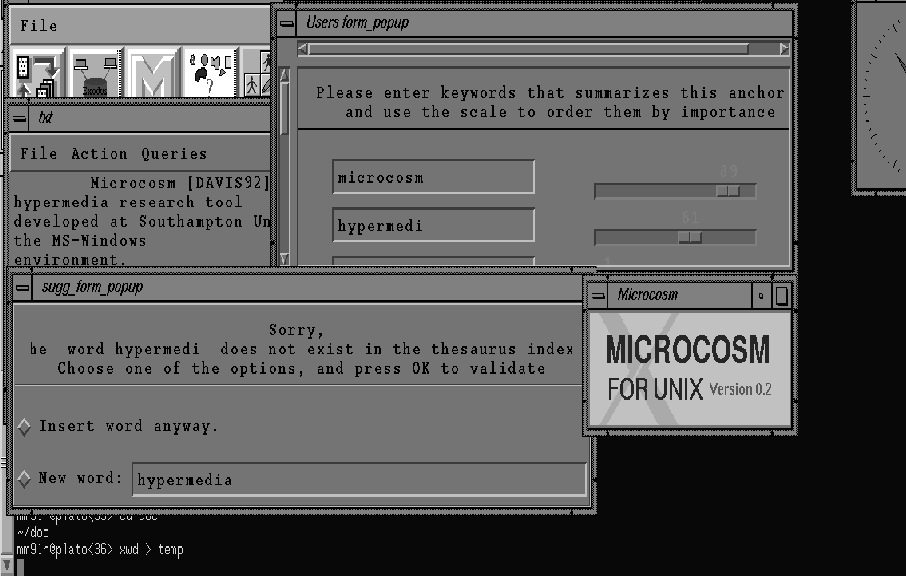
Vision and Reality of Hypertext and GUIs: 2.1.13 Microcosm @mprove
Microcosm (cf. 2.1.13) is a research project at the University of Southampton. Like Intermedia five years before, Microcosm is designed around the idea that material of diverse sources and formats should be tied together into one hypertext. To achieve this goal links have to be separated from the documents. They are stored and maintained in special link databases. In contrast to Intermedia, Microcosm plays the active role in gathering the necessary data out of the documents. For each topic it stores data on which documents contain information about it and also where inside the documents the information is located. This elaborated conception of links can be seen more as a kind of Memex’ trails than simple one-to-one links. Given this structure dynamic linking becomes possible. This means that links can be associated with generic text strings. Wherever this string shows up a link is placed automatically. This has the effect that documents that are imported for the first time into Microcosm can have links immediately.
The HotJava Browser: A White Paper
Browsers allow people to treat the data spread across the Internet as a cohesive whole. Web browsers integrate the function of fetching the data with figuring out what it is and displaying it. One of the most important file types browsers understand is the hypertext markup language (HTML). HTML allows text data objects to embed simple formatting information and references to other objects.
Constructing an HTML Tree | Web Browser Engineering
So far, our browser sees web pages as a stream of open tags, close tags, and text. But HTML is actually a tree, and though the tree structure hasn’t been important yet, it will be central to later features like CSS, JavaScript, and visual effects. So this chapter adds a proper HTML parser and converts the layout engine to use it.
this is also a thing, but separate from the basic website stuff anna is talking about. the at:// potential is sort of about navigating to that sort of URI in browser bar. but I think more realistically, having anchor links. <a atref="at://..."> (or more realistically: data-atp="at://...")
