

### Summary As reported: > For the Firefox MV2 extension, it’s possible for a webpage to iframe the element picker and control it to add arbitrary trusted filters when a user clicks on the...
Universal XSS in uBlock Origin from website-driven element picker
One-click UXSS issue with uBlock Origin on Firefox through element picker

XSS Rays - The Spanner
I've developed a new XSS scanner tool that's written in Javascript called XSS Rays for Microsoft. They have given me permission to release the tool as open source which is awesome because it can be used for other open source applications. I recommend you use it as part of the web development process to make sure you've filtered XSS correctly on your application. It works as a bookmarklet and scans any links, paths or forms on the target scanning page (even cross domain). You can add vectors to it quite easily and it includes some of the most common injections I've found on sites over the years. I've tested it on IE7/IE8 and Firefox but it could work in other browsers. The advantage of the bookmarklet is that vectors can be customised for each browser and they are executed in the context of the browser, in IE8 standards mode were css expressions are disabled in IE8 the vector won't be executed for example. Hopefully there should be no false positives either because each vector is actually executed and it reported back as successful, in fact if there is a false positive it will be a bug in my code (lets hope not). Technical details The code works by creating connections to the target links/paths using iframes, each iframe is assign a name which is the url to return to on successful execution (the originating url). This allows cross domain links to be checked. The vectors are stored in a simple object, each vector has the following properties:- input, name, browser, form, url, path (there's a optional second input). Input is the XSS vector, the string "XSS" is used to replace with a logger or a poc url and is required by all vectors. Name is just a meaningful name applied to the vector, browser supports ALL|FF|IE and helps to save time when testing specific browser vectors as XSS Rays will only target those versions for the vector. Form, url, path allows you to disable the vector for scanning forms etc, supports TRUE|FALSE. There are a few configuration properties supported:- 1. externalLog - Sends all executions to a external logger by default "http://127.0.0.1/XSSRays/logging/xsslogger.php", the vector is encoded and sent to a get variable xss and can be easily customised to log in another language, each field is sent tab separated. 2. excludeURLS - allows you to exclude certain urls from the scan, the variable is a regular expression so remember to double escape special characters. 3. sameorigin - When enabled it should stay to the same site and not scan external links, this has not be tested fully yet. There's a interesting little hack for IE to enable the onload event of a dynamic iframe, I use the following code to create a specific IE loader:- <pre lang="javascript"> var ieLoader = "document.getElementById('"+'ray'+self.uniqueID+"').ieonload()"; if(self.isIE()) { try { var iframe = document.createElement('<iframe name="'+location + '#xss'+'" onload="'+ieLoader+'">'); } catch (e) { var iframe = document.createElement('iframe'); } } else { var iframe = document.createElement('iframe'); } </pre> Download & Instructions Download here 1. You need to install a local web server like xampp:- http://www.apachefriends.org/en/xampp.html 2. Once installed copy the XSSRays directory to your web server root xampp root is :- C:\xampp\htdocs\ 3. Open the bookmarklet.html file in the helpers directory of XSSRays. Drag to your bookmarks toolbar on Firefox or on IE right click the link and click add to favorites (You might get a security warning in IE). 4. Find your web site that you wish to scan, click your bookmarklet. Then press CTRL+SHIFT+X which will now run XSS Rays on the target site. Thanks Big thanks to David Ross, Manuel Caballero and you (you know who you are) for testing and feedback. Thanks to Microsoft for supporting the development of XSS Rays. Updates.... The latest version of XSS Rays is now online (0.5.0), it contains some speed improvements and bug fixes. 1. Fixed conflicts with form elements with the name action or submit was causing form posts not to be submitted. Thanks Mike W 2. Removed unneeded cleanup code now the IE onload works. 3. Added the ability to exclude certain field types and names from being XSS'd. 4. Fixed name vector to specify window.name which was causing conflicts with image elements. 5. Fixed and checked same origin code. Thanks to Arshan who gave me a kick up the backside :) 6. Removed keyboard shortcut and added a button instead. New update 0.5.5 1. Fixed Firefox bug with same origin 2. Fixed form Post to allow field names with submit. Thanks Kuza55 for the awesome form post hack :)

Reducing XSS by way of Automatic Context-Aware Escaping in Template Systems
Posted by Jad S. Boutros, Security Team Building on our earlier posts on defenses against web application flaws [ "Automating Web Applicatio...

w3c/trusted-types
A browser API to prevent DOM-Based Cross Site Scripting in modern web applications.

Responsive iframes in Chrome 154 | Blog | Chrome for Developers
Chrome 154 adds support for responsively-sized iframes, letting an iframe size itself based on the intrinsic size of its embedded document.
HTML Can Do That
HTML has been gobbling up swathes of what used to be JavaScript’s remit. This page lists a bunch of dynamic functionality that we can now achieve with just HTML.

HTML Can Do That
HTML has been gobbling up swathes of what used to be JavaScript’s remit. This page lists a bunch of dynamic functionality that we can now achieve with just HTML.
jack (@jack@mastodon.sdf.org)
#Mozilla wants to know what you want from them and, in particular, #Firefox. Let. Them. Know. https://mozillafoundation.tfaforms.net/201
Supporting Embedded Content | Web Browser Engineering
While our browser can render complex styles, visual effects, and animations, all of those apply basically just to text. Yet web pages contain a variety of non-text embedded content, from images to other web pages. Support for embedded content has powerful implications for browser architecture, performance, security, and open information access, and has played a key role throughout the web’s history.
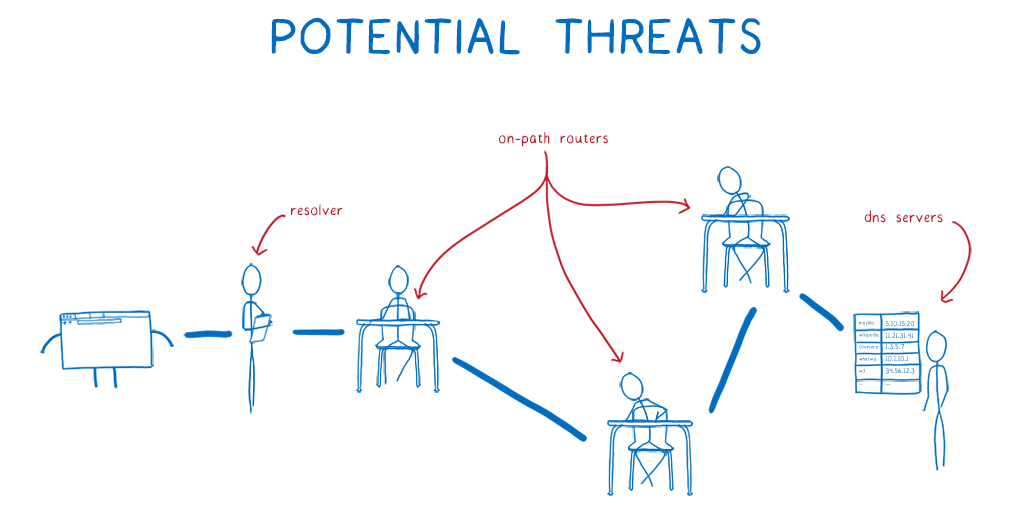
A cartoon intro to DNS over HTTPS – Mozilla Hacks - the Web developer blog
At Mozilla, we closely track threats to users' privacy and security. This is why we've added tracking protection to Firefox and created the Facebook container extension. In today's cartoon intro, ...
PayPal Builds 'Zoid' JavaScript Library To 'Make IFrames Cool Again' - Slashdot
"Earlier this year I gave a talk at FullStack conference in London about making iFrames cool again," writes a lead engineer at PayPal. In a nutshell: iframes let you build user experiences into embeddable 'cross-domain components', which let users interact with other sites without being redirected....

HTML Standard
The src attribute gives the URL of a page that the element's content navigable is to contain. The attribute, if present, must be a valid non-empty URL potentially surrounded by spaces. If the itemprop attribute is specified on an iframe element, then the src attribute must also be specified.
Client side include feature for HTML · Issue #2791 · whatwg/html
Spun off from HTML modules discussion There are certain amount of interest that including HTML snippet into an HTML document, without using JavaScript. That would be similar to <iframe>, but ...
<dialog> HTML dialog element - HTML | MDN
The <dialog> HTML element represents a modal or non-modal dialog box or other interactive component, such as a dismissible alert, inspector, or subwindow.

#atprotodev my prototype extension has been approved! Your thoughts? Tag your HTML with RDFa compliant at:// attrs and it gives you a context menu & at-ray vision 😊 Firefox: addons.mozilla.org/en-GB/firefox/addon/where-it-… Chrome: chromewebstore.google.com/detail/where-its-at/oemnpmaoj… Safari: github.com/jphastings/where-its-AT/relea…

Where it's AT – Get this Extension for 🦊 Firefox (en-GB)
addons.mozilla.org