

The src attribute gives the URL of a page that the element's content navigable is to contain. The attribute, if present, must be a valid non-empty URL potentially surrounded by spaces. If the itemprop attribute is specified on an iframe element, then the src attribute must also be specified.
Jekyll Tip: Absolute URLs for Links and Images in RSS Feed
When I write a post and add an image, the image lives in the “files” folder. When Jekyll builds the static site local...
Client side include feature for HTML · Issue #2791 · whatwg/html
Spun off from HTML modules discussion There are certain amount of interest that including HTML snippet into an HTML document, without using JavaScript. That would be similar to <iframe>, but ...
My HTML boilerplate in 2026 - Manuel Matuzović
Every element I use for the basic structure of a HTML document, with explanations why.

My HTML boilerplate in 2026 - Manuel Matuzović
Every element I use for the basic structure of a HTML document, with explanations why.
URL Fragment Text Directives
Copyright © 2023 the Contributors to the URL Fragment Text Directives Specification, published by the Web Platform Incubator Community Group under the W3C Community Contributor License Agreement (CLA). A human-readable summary is available.
URL Fragment Text Directives
Copyright © 2023 the Contributors to the URL Fragment Text Directives Specification, published by the Web Platform Incubator Community Group under the W3C Community Contributor License Agreement (CLA). A human-readable summary is available.

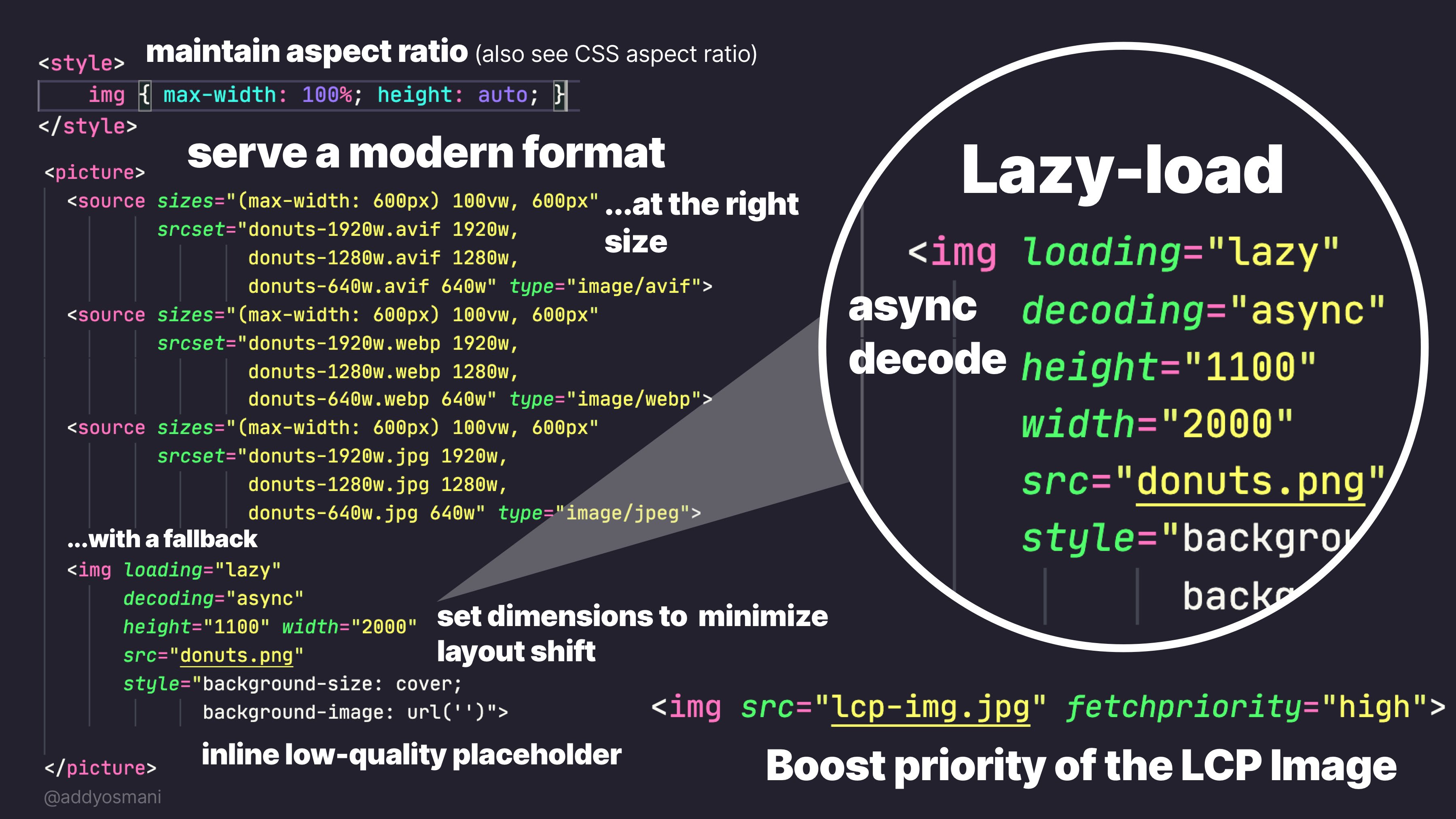
Practical guide to the <img> element: from the basics to LCP | Joan León
The <img> element has attributes that make a real difference in performance: loading, decoding, fetchpriority, srcset and sizes. A practical guide to using them well.
element() CSS function - CSS | MDN
The element() CSS function defines an <image> value generated from an arbitrary HTML element. This image is live, meaning that if the HTML element is changed, the CSS properties using the resulting value are automatically updated.

<dialog> HTML dialog element - HTML | MDN
The <dialog> HTML element represents a modal or non-modal dialog box or other interactive component, such as a dismissible alert, inspector, or subwindow.
Responsive iframes in Chrome 154 | Blog | Chrome for Developers
Chrome 154 adds support for responsively-sized iframes, letting an iframe size itself based on the intrinsic size of its embedded document.

If you're an #atprotodev I'd love your thoughts on this short proposal. I think we'd all benefit from a way to tag our HTML to reference the at:// uris they're derived from! @popfeed.social, @bookhive.buzz, @sifa.id, @leaflet.pub, @pckt.blog, @offprint.app and many more — penny for your thoughts?

Atproto markup for HTML
byjp.leaflet.pubHey #atprotodev; should we make a convention for annotating HTML elements with the AT uris they’re built with? (So that, say, a browser extension could offer links to @pds.ls) Something like this? <li typeof="schema:Thing" resource="at://did:web:example.com/org.example.lexicon/rkey">
this is also a thing, but separate from the basic website stuff anna is talking about. the at:// potential is sort of about navigating to that sort of URI in browser bar. but I think more realistically, having anchor links. <a atref="at://..."> (or more realistically: data-atp="at://...")
got me thinking too, we should create a standard way for standard site hosts to expose embedable content. Maybe an html subset, maybe just an iframe, maybe something else?

Rudy Fraser
What do streets think about being able to read long form content / blogs from within blacksky.community (powered by standard.site) @pckt.blog @leaflet.pub @offprint.app in the below rough demo.


