

How to redefine git push for an era of distributed code. No canonical source; no platform lock-in. A re-implementation of git push that sends your code anywhere and everywhere. Nice features like branch protection are still possible, but able to defined locally, remotely, or both. Single locations can be defined as "canonical" upstream sources. Or code can have no canonical source, and just spread out and be used and interacted with wherever people like.
Code Repository - Git Source Control | Harness
Host Git repositories in Harness, manage pull requests, and connect every commit to secure CI/CD workflows with source-to-deploy traceability.

Git at any scale · Cursor
Hosting Git repositories at scale is a nightmare. When Linus Torvalds designed the first version of the information manager from hell (that's actually the tagline for Git, look it up), he had a very specific use case in mind: his own. He wanted to replace BitKeeper, the distributed version control system that was being used to develop the Linux Kernel. Of course, the replacement had to be distributed too. The Kernel is an unusual software project; it is extremely decentralized, with many different maintainers for its many different subsystems. A distributed version control system is a natural fit for this workflow.

Pro Git
Pro Git (Second Edition) is your fully-updated guide to Git and its usage in the modern world. Git has come a long way since it was first developed by Linus Torvalds for Linux kernel development. It has taken the open source world by storm since its inception in 2005, and this book teaches you how to use it like a pro. Effective and well-implemented version control is a necessity for successful web projects, whether large or small. With this book you’ll learn how to master the world of distributed version workflow, use the distributed features of Git to the full, and extend Git to meet your every need. Written by Git pros Scott Chacon and Ben Straub, Pro Git (Second Edition) builds on the hugely successful first edition, and is now fully updated for Git version 2.0, as well as including an indispensable chapter on GitHub. It’s the best book for all your Git needs.

knotless
Git that lives in your Atmosphere account. Clone and push with plain git, and let agents work over MCP.
Pushin.eu — Git hosting that never leaves Europe
Sovereign, GDPR-native git hosting — code, issues, and CI, all on European soil.

Solving Git's Pain Points with Jujutsu (with Martin von Zweigbergk)
Git is already federated & decentralized
This blog post was published on July 23, 2018. It might be out of date, have broken images or links, or simply contain bad ideas and opinions that didn't stand the test of time. Please read generously!
Entire · A new developer platform is coming
Entire is a fast, distributed, Git-compatible network for mirroring GitHub repositories so agents can clone fast without hitting origin rate limits.

GitHub · Change is constant. GitHub keeps you ahead. · GitHub
Join the world's most widely adopted, AI-powered developer platform where millions of developers, businesses, and the largest open source community build software that advances humanity.

Public Front-end And Private Back-end For My Sites On Github
I moved my public presence onto Github almost two years ago, running API Evangelist as 90+ Github repositories, driving each portion of my presence using Github Pages, HTML, CSS, JavaScript, and JSON. Each of my research sites run as a public website using Github pages, in the gh-pages branch of its repository. Over the last year I've been playing with how to use the master branch for some projects, as a private content and data storage. Github repositories are cool like that, where you can make the gh-pages branch public, and the master branch private. If I don't want some content, JSON data, or files public, I just put it in the master branch for the research project. Github All of this is possible because of Github, the social coding platform. Github provides a cloud platform on top of the open source software management solution Git. Using Github I can create repositories that act as storage solutions for each of my research projects. I count 78 repositories currently making up the API evangelist network, but I see over 100+ repositories in my Github profile. Most of my repositories are publicly available which is free with Github, but a growing number are private, and my monthly bill for Github has increased each year. Github Pages Github provides a simple new service that transformed Github repositories from code management folders, into public websites, called Github Pages. With a three step wizard, any Github repository can have a new Github Pages (gh-pages) branch, immediately giving each repository a public face. Each Github Pages site is extremeley simple, only running HTML, Markdown, CSS, and JavaScript, but thats ok, it is just the way I like it. Jekyll Jekyll is a simple, blog-aware, static site generator perfect for personal, project, or organization sites. Jekyll gives you the ability to manage the look and feel of your site, along with simple management of pages, and a blog. The rest is up to you. There are plenty of folks who are pushing the boundaries of what Jekyll can do, comparable to the evolution of the WordPress platform, but in a much more static way--Jekyll is the hollywood front for all of my public website. Github API Along with Git repositories, Github Pages, and the other social features, Github provides an API which gives you access to users, repositories, files, and pretty much every other aspect of the Github platform. This means that each one of my research projects, and their public web sites have an API. I use the Github API to publish all of the blog posts, pages, and JSON data files that support my research, across 78+ projects. oAuth.io oAuth.io is the fastest, and easiest way to integrate oAuth of popular platforms into your apps. This is no joke, with just a few lines of code, you can put Facebook, Twitter, Github, and other platforms oAuth into use on any website. I use oAuth.io for putting Github to work as the identity and access layer of my network. After you setup your oAuth.io account, setup an oauth.io and Github application, and connect them together, all I do is grab my app key, and publish this JavaScript: In the header of my websites, I add a little handler that keeps an eye out for the incoming oAuth_Token--Github and oauth.io handle everything else. If the oAuth_Token is available, using JavaScript I rewrite any navigation, and other key links, appending oAuth_Token to the link, so that it will travel with the user from page to page, alerting the website that the user is authenticated. Github.js Next I use Github.js, a JavaScript wrapper for the Github API. Using the oAuth_Token I get using oAuth.io and the Github API, I can now make actual API calls using the Github.js wrapper to the private master branch of this repository, that is, if you have access. There is one more layer of security, before you can actually get access to anything. Using Github.js I try to grab the contents of a file in the private, master repository, and if the authenticated Github user is added as a collaborator on the repository, the call is successful, if not I deny the user access to any content, data or files in the projects master repo. This is the line between public and private, or front-end and back-end on my websites. Using Github identity as authentication to my private world, I am able control who has access, using the standard Github organization, and user management. Currently I’m using this layer to decide whether or not to access and display data from JSON files, and access to PDF files located in the master branch. You can see this in action via my messaging research of email, SMS, or MMS. If you are listed on each of the projects repos as a collaborator, and logged in via Github, you can see the building blocks for each research area, and the current PDF version of the research report--otherwise you just get the default information. As with all of my work, this is a work in progress. This step in my evolution is all about using as a paywall for my research, where other tools I’ve built like my CSV Converter, and Data On Github applications are using the master branch as application store, even if you aren't logged in the app will still run, you just can’t save anything. Next I’m going to play with this approach as part of my API broker research, exploring different ways of aggregating APIs, and managing key access using the private master branch for each repository.

Entire Launches Distributed Git Network for the Agent Era
Five months after the largest seed round in developer-tools history, Entire is reimagining version control for agent-scale development, allowing developers to mirror GitHub repositories on a fast, independent Git network built for agents.
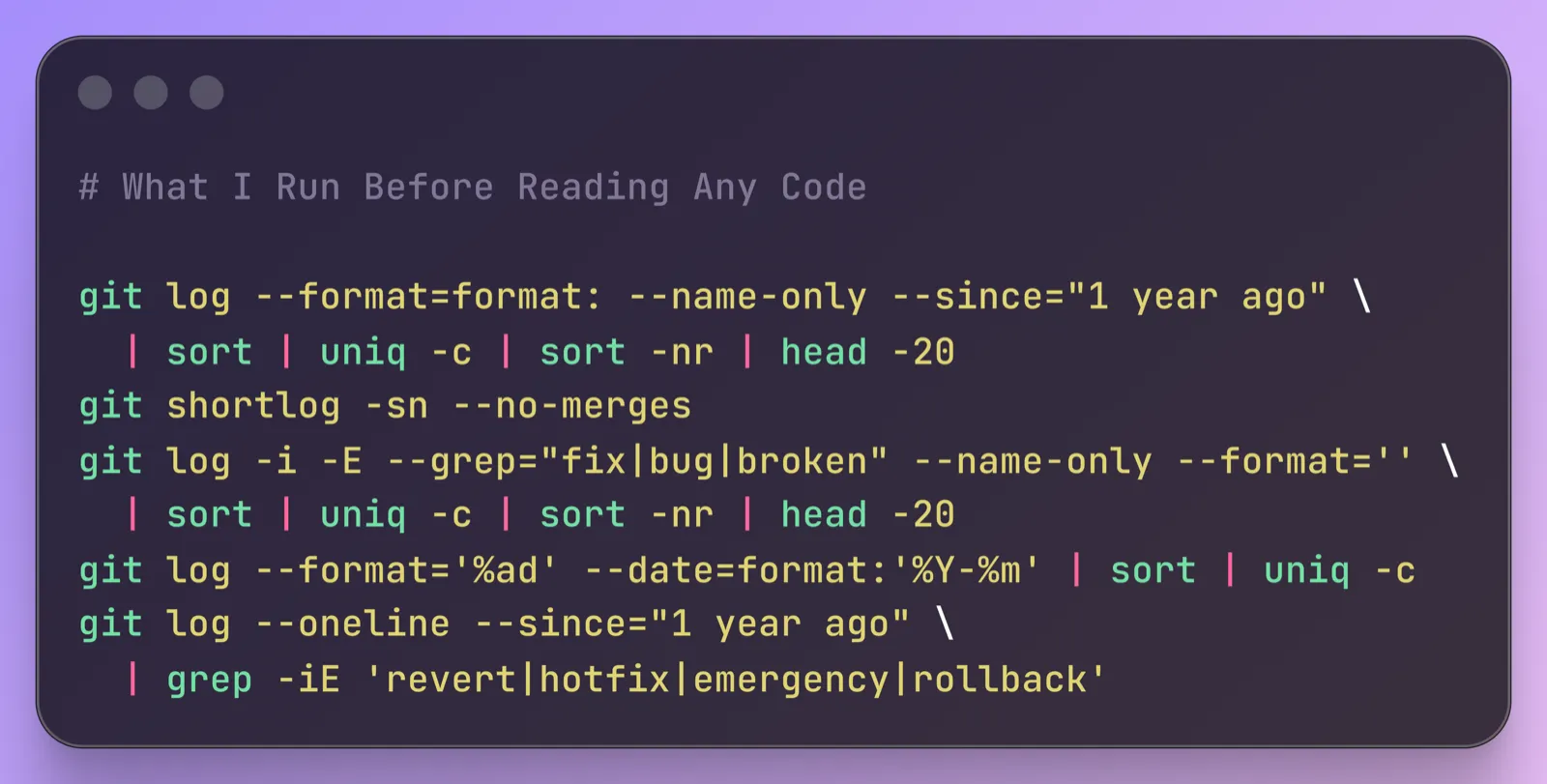
The Git Commands I Run Before Reading Any Code
Five git commands that tell you where a codebase hurts before you open a single file. Churn hotspots, bus factor, bug clusters, and crisis patterns.
A method for giving credit to organizations that contribute code to Open Source
By tracking organizational contributions in Git commits, we can give organizations more tangible reasons to fund open source and help sustain it over time.