

A fully local browser workflow for COLMAP and Gaussian Splatting.
Browser Use - The way AI uses the internet
78,000+ GitHub stars. Trusted by Fortune 500. The #1 open-source browser automation platform.
Experiments with Google
Since 2009, coders have created thousands of amazing experiments using Chrome, Android, AI, WebVR, AR and more. We're showcasing projects here, along with helpful tools and resources, to inspire others to create new experiments.

TractorBeam: Malleable AI support for the way that you read - AI in the Last Mile
Introducing TractorBeam, a browser extension to develop custom AI highlighting systems on PDFs
BrainBrowser: distributed, web-based neurological data visualization
Recent years have seen massive, distributed datasets become the norm in neuroimaging research, and the methodologies used analyze them have, in response, become more collaborative and exploratory. Tools and infrastructure are continuously being developed and deployed to facilitate research in this context: grid computation platforms to process the data, distributed data stores to house and share them, high-speed networks to move them around and collaborative, often web-based, platforms to provide access to and sometimes manage the entire system. BrainBrowser is a lightweight, high-performance JavaScript visualization library built to provide easy-to-use, powerful, on-demand visualization of remote datasets in this new research environment. BrainBrowser leverages modern Web technologies, such as WebGL, HTML5 and Web Workers, to visualize 3D surface and volumetric neuroimaging data in any modern web browser without requiring any browser plugins. It is thus trivial to integrate BrainBrowser into any web-based platform. BrainBrowser is simple enough to produce a basic web-based visualization in a few lines of code, while at the same time being robust enough to create full-featured visualization applications. BrainBrowser can dynamically load the data required for a given visualization, so no network bandwidth needs to be waisted on data that will not be used. BrainBrowser's integration into the standardized web platform also allows users to consider using 3D data visualization in novel ways, such as for data distribution, data sharing and dynamic online publications. BrainBrowser is already being used in two major online platforms, CBRAIN and LORIS, and has been used to make the 1TB MACACC dataset openly accessible.

The Lively Kernel
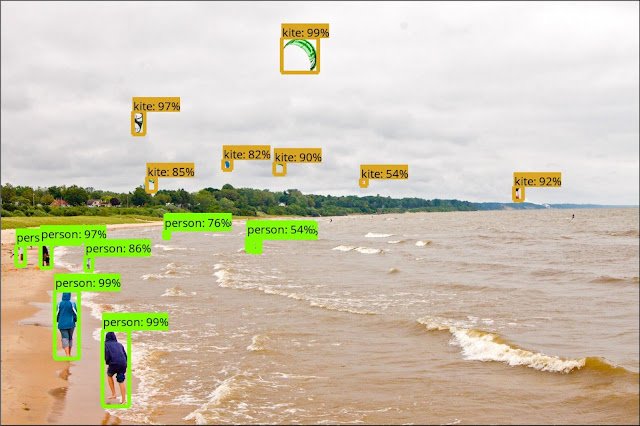
Supercharge your Computer Vision models with the TensorFlow Object Detection API
Posted by Jonathan Huang, Research Scientist and Vivek Rathod, Software Engineer (Cross-posted on the Google Open Source Blog) At Google, we develo...
BSidesSF 2018 - Navigating the Vast Ocean of Browser Fingerprints (Russell Thomas)
mapbox/pixelmatch
The smallest, simplest and fastest JavaScript pixel-level image comparison library
ECMAScript: latest and upcoming features

Zain Shah (@zan2434)
Imagine every pixel on your screen, streamed live directly from a model. No HTML, no layout engine, no code. Just exactly what you want to see. @eddiejiao_obj, @drewocarr and I built a prototype to see how this could actually work, and set out to make it real. We're calling it Flipbook. (1/5)

WebKitGTK 2.54 highlights - The WebKitGTK Project
The WebKit team at Igalia is happy to announce a new release series of WebKitGTK. The main highlight of this release is a new web process compositor built on the Skia graphics library, replacing the TextureMapper-based one. Read on for the details, along with a summary of the other most noteworthy changes from the latest release cycle.

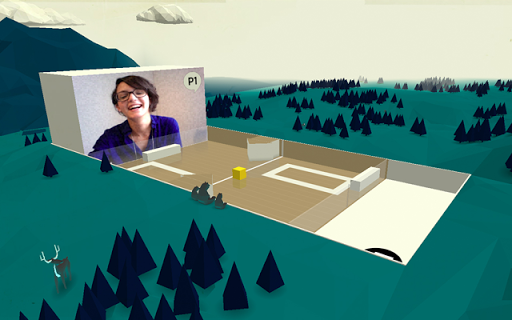
Cube Slam by Google - Experiments with Google
Since 2009, coders have created thousands of amazing experiments using Chrome, Android, AI, WebVR, AR and more. We're showcasing projects here, along with helpful tools and resources, to inspire others to create new experiments.
Adding Visual Effects | Web Browser Engineering
Right now our browser can only draw colored rectangles and text—pretty boring! Real browsers support all kinds of visual effects that change how pixels and colors blend together. To implement those effects, and also make our browser faster, we’ll need control over surfaces, the key low-level feature behind fast scrolling, visual effects, animations, and many other browser capabilities. To get that control, we’ll also switch to using the Skia graphics library and even take a peek under its hood.