With Signal on Desktop and iPad, you can link your primary Android or iOS account with another device, letting you check and respond to messages in both places or conduct video meetings and calls from the comfort of a bigger screen. Signal’s upcoming beta releases will also introduce the option t...
What is Signal? The messaging app, explained.
With news this week of the messaging app being used to discuss war plans, we get you up to speed on what Signal should be used for—and what it shouldn’t.

Phone Numberless Registration for Android beta
The latest Signal beta update for Android introduces an optional way to create a Signal account. Signal Login lets you create and use a Signal account without a phone number. Instead, you make a sm...
Signal Messenger: Speak Freely
Say "hello" to a different messaging experience. An unexpected focus on privacy, combined with all of the features you expect.
Disappearing messages for Signal
The latest Signal release for iPhone, Android, and Desktop now includes support for disappearing messages. The timer has come With this update, any conversation can be configured to delete sent and received messages after a specified interval. The configuration applies to all parties of a convers...
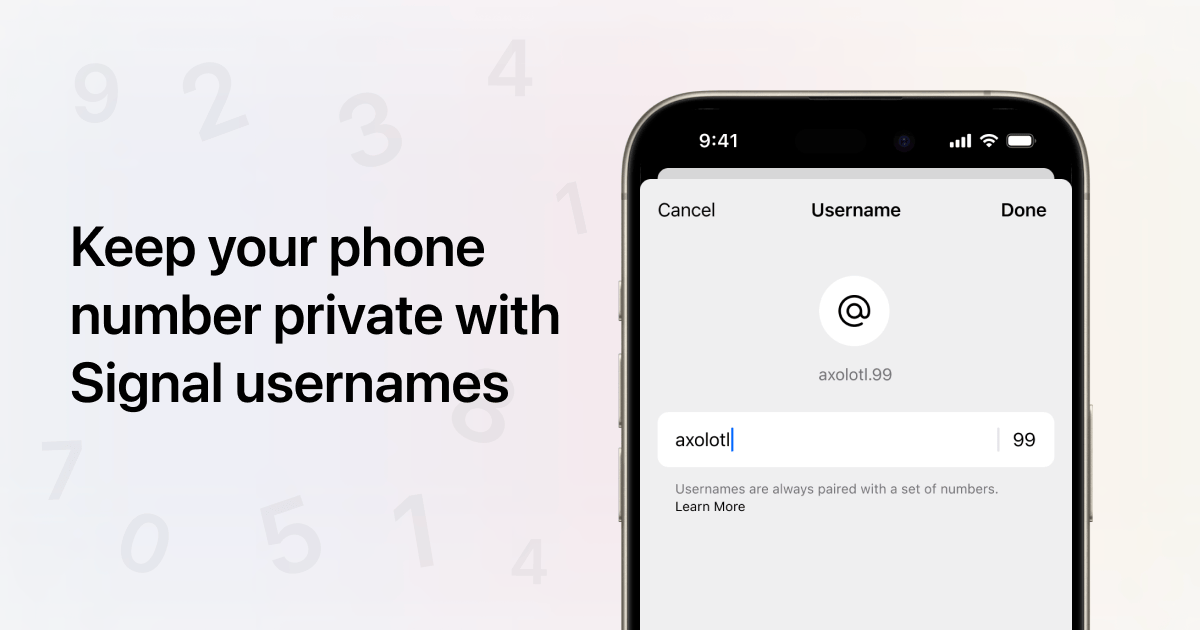
Keep your phone number private with Signal usernames
Signal’s mission and sole focus is private communication. For years, Signal has kept your messages private, your profile information (like your name and profile photo) private, your contacts private, and your groups private – among much else. Now we’re taking that one step further, by making your...
Under Meredith Whittaker, Signal Is Out to Prove Surveillance Capitalism Wrong
On its 10th anniversary, Signal’s president wants to remind you that the world’s most secure communications platform is a nonprofit. It’s free. It doesn’t track you or serve you ads. It pays its engineers very well. And it’s a go-to app for hundreds of millions of people.

How to: Use Signal
Download location: Google Play Store, Apple App Store System requirements: Android 5 or later, iOS 13 or later Version used in this guide: Android: 7.38.6 iPhone: 7.5.1 License: GPLv3 Level: Beginner Time required: 15-20 minutes Other reading: https://signal.org/ https://support.signal.org/ https://signal.org/blog/ Table of Contents Download and Install Signal Register and Verify...
Multi-device calls with ICE forking
Now that voice and video calls are available for everyone on Signal Desktop and iPad, in addition to our mobile clients, we want to share a closer look at the technology that makes it possible for incoming calls to ring across multiple devices. Every call placed on Signal has always been private ...
How to Use Signal Encrypted Messaging
The best end-to-end encrypted messaging app has a host of security features. Here are the ones you should care about.
The dawn of trustworthy computing
When we currently use a smart phone or a laptop on a cell network or the Internet, the other end of these interactions typically run on othe...
Signal Messenger: Speak Freely
Say "hello" to a nonprofit messaging and calling experience focused on your privacy, combined with all the features you expect.
Building peer-to-peer apps | Apple Developer Documentation
Communicate with nearby devices over a secure, high-throughput, low-latency connection by using Wi-Fi Aware.