

🐥 Want to start saving tweets and threads? ⮕ https://t.co/I1gVZlyn7G 🖍 Want to save, review, and sync your highlights from books/articles/twitter/anywhere? ⮕ https://t.co/WU9u8wyhwO 📚 Looking for our new app? ⮕ @ReadwiseReader— Readwise (@readwise) September 1, 2022
Read and Share Twitter Threads easily!
Thread Reader helps you read and share the best of Twitter Threads
Read and Share Twitter Threads easily!
Thread Reader helps you read and share the best of Twitter Threads
How to Set Up Your Reader Feed
In this video, we'll teach you how to bring your favorite email newsletters, RSS feeds, and Twitter accounts into Reader, where you can process them in peace 😌 🎁 Sign up for a free 30-day trial: https://readwise.io/read *This video covers:* 00:00 Why set up your feed? 00:27 What's the difference between Feed and Library? 02:10 Subscribing to RSS feeds from the library 02:32 Suggested Feeds 02:59 Importing feeds from another service 03:33 Searching for feeds 03:42 Managing feeds 04:21 Subscribing to newsletter feeds 04:43 Subscribing directly with your Reader email 05:21 Setting up auto-forwarding 05:32 Clean vs Original View for emails 06:30 Subscribing to Twitter lists 07:14 Processing your feed 08:30 Maintaining app performance *More Resources:* Getting Started with Reader: https://www.youtube.com/watch?v=eJBtvfbcic0 Organizing Your Documents in Reader: https://www.youtube.com/watch?v=uefrzMb5qBc Setting up auto-forwards form Gmail: https://support.google.com/mail/answer/10957?hl=en Setting up auto-forwards from Apple Mail: https://support.apple.com/guide/icloud/automatically-forward-email-mm6b1a3960/icloud Setting up auto-forwards from Outlook: https://support.microsoft.com/en-us/office/turn-on-automatic-forwarding-in-outlook-7f2670a1-7fff-4475-8a3c-5822d63b0c8e

Getting Started with Reader
Welcome to the essential beginners tutorial for Reader: our very own read-it-later app that helps you bring *all* of your reading into one place. That includes articles, books, PDFs, RSS feeds, email newsletters, Tweets, and videos. 🎁 Sign up for a free 30-day trial: https://readwise.io/read *This video will teach you everything you need to get started:* 00:00 The Problem 00:15 What is Reader? 00:33 Installing web extension and mobile apps 00:40 Adding new documents on desktop 01:14 Uploading files from desktop 01:23 Subscribing to email newsletters 01:37 Importing your library from Pocket, Instapaper, or Omnivore 01:44 Saving documents on mobile 01:50 What's the difference between Library and Feed? 02:38 Importing feeds from another app 02:49 Home section 03:08 Keyboard shortcuts 03:50 Full-text search 04:05 Reading and highlighting 04:20 Exporting and searching your highlights 04:40 Text-to-speech 05:00 What is Ghostreader? 05:47 De-activate AI features 06:00 Submitting feedback and questions *More Resources:* How To Set Up Your Reader Feed: https://www.youtube.com/watch?v=uDr9N0rV4EE Organizing Your Documents in Reader: https://www.youtube.com/watch?v=uefrzMb5qBc

How to Set Up Your Reader Feed
Becky Isjwara on Twitter / X
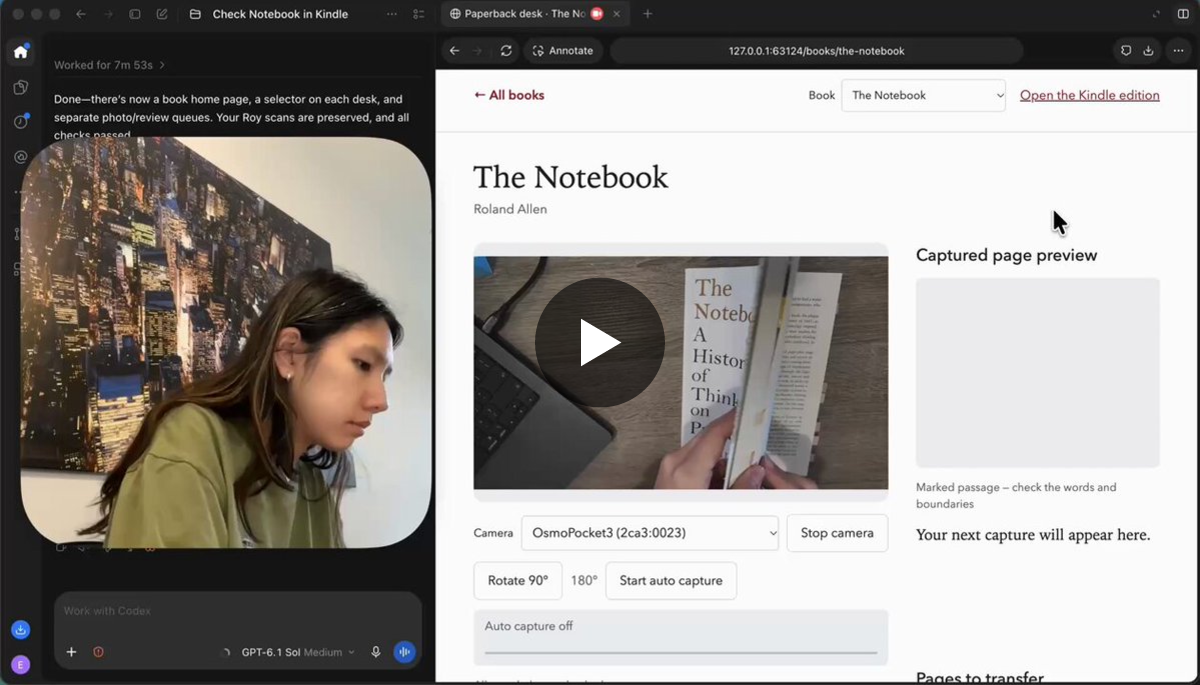
I made a Codex-native app that can transfer highlights from my paperbacks to my ebook copies.Osmo Pocket takes photos and sees the highlight. Takes a pic, uses OCR, then uses computer use to highlight my Kindle copy.Everything syncs on @readwise ✨ pic.twitter.com/wTD80t9QpA— Becky Isjwara (@beckyisj) October 12, 2026
NewsBlur - A Personal News Reader
Follow RSS feeds, train stories with intelligence filters, and read smarter. Free on web, iOS, and Android. Open source.

Ian Vanagas on Twitter / X
I've been enjoying writing screenshot essays lately because they provide more depth than tweets while being easier to finish and share than blogs.To help with this, I built a little app that makes it easier to make nice looking ones: https://t.co/mybEawgwgFEnjoy! https://t.co/gMHUCMzRbL— Ian Vanagas (@IanVanagas) March 30, 2024
Feedbro - RSS Feed Reader
Feedbro Feed Reader with an integrated Rule Engine - follow Atom/RSS/RDF based blogs, social media sites and news effortlessly!

Automate Your Highlights: The Lazy Genius Guide to Remembering What You Read
Threads confirm new save feature, similar to Instagram and X
Threads is introducing a new feature to allow users to save posts for later access in a move that brings it in line with other platforms.

Readeck: Home
Save interesting articles, long read, pictures, videos. Read or revisit them later.

You can now save articles from @skyreader.app to your @semble.so and @margin.at collections!
Today's @skyreader.app update improves the discussion for every article you read. - commentary across bluesky, @semble.so, and @margin.at - semble collections the article appears in - semble typed connections to other articles with one-tap save to read later
Main integration I want is with @semble.so From Skyreader: Save article to Semble. From Semble: Subscribe to article (blog) feed. Semble could also intelligently recommend feeds I could follow based on repeated saves from the same website-feed.
Big improvements to @skyreader.app making it more social! Articles you share are now published as a @standard.site linkblog. Follow Skyreader linkblogs in any @standard.site reader (or traditional RSS reader!) Finding your people in Skyreader is also now much improved. Let me know what you think!

Skyreader update - Linkblogs, standard.site, and discussions
skyreader-dev.leaflet.pub
