Samsung Galaxy Tab S7 Plus - Note Taking & S Pen Review (Writing / Drawing / Sketching) Samsung Galaxy Tab S7 Plus handwriting, note taking, drawing, sketching and S Pen review! We have tested the S Pen with the Samsung Galaxy Tab S7 Plus and check this out .... The Tab S6 Lite Pen and the Tab S6 pen - we really went for it switching devices and pens!!! Join us reviewing the Samsung Galaxy Tab S7 Plus on everything note related :) #samsung #tabs7plus Buy the Canon EOS R https://amzn.to/2MVTtEA Buy the Canon EOS M50 https://amzn.to/2I475Pz Twitter: https://www.twitter.com/allstarspace Instagram https://www.instagram.com/allstarspace Website: https://www.allstarspace.com
The Best Note-Taking Apps
We recently polled readers with suggestions for the best note-taking apps. Most of you said you still do things the old-fashioned way with pen and p

Supernote - Go Paperless with Our Digital Note-Taking Solution
Supernote is a modern E-Ink tablet and digital notebook designed for handwriting, note-taking, and sketching. Shop Supernote online today.

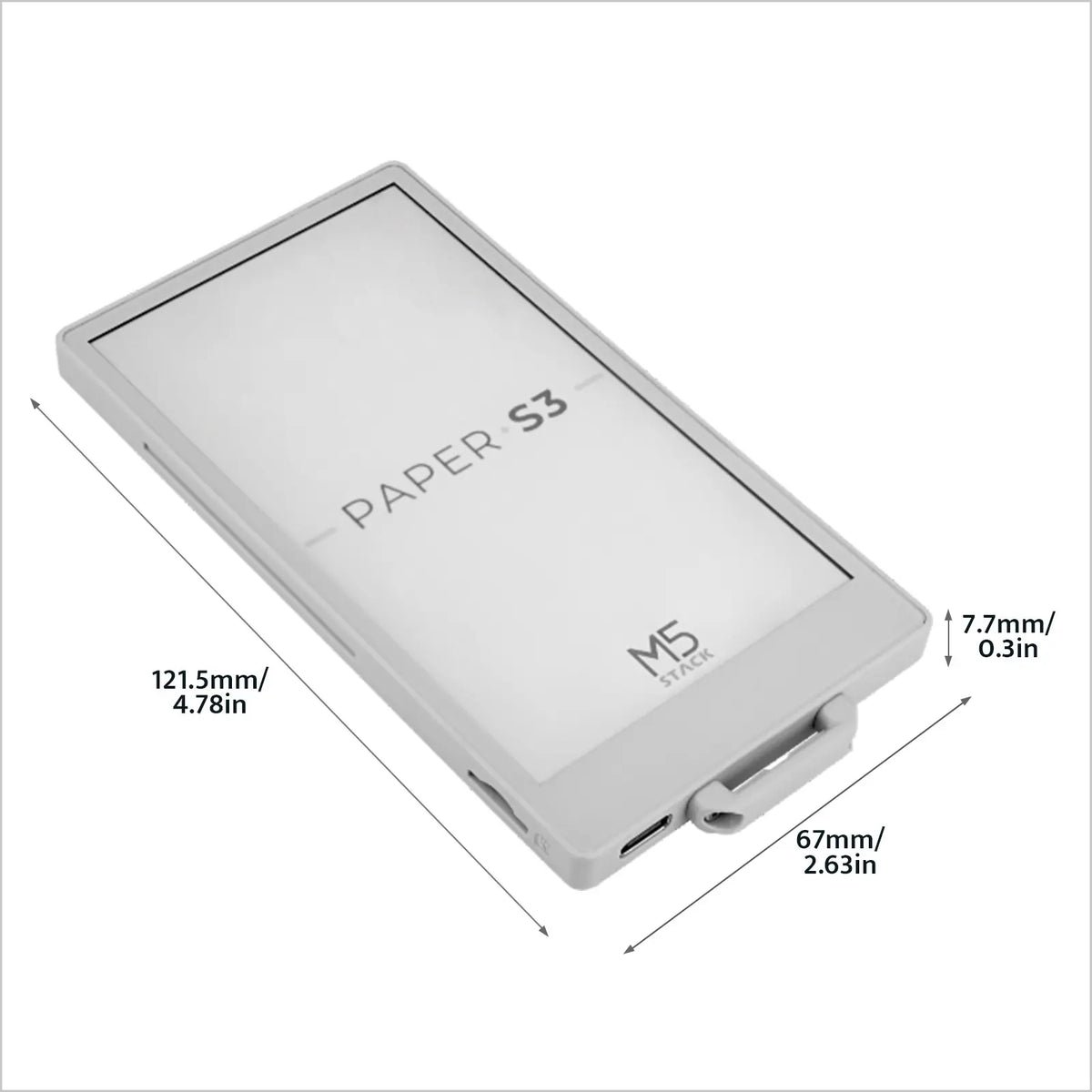
[EOL] M5PaperS3 ESP32S3 Development Kit (960x540, 4.7" eInk Display, 235 ppi)
PaperS3 is a uniquely designed low-power touch-enabled e-ink screen main control device launched by M5Stack. The controller uses the ESP32-S3. The front of the device is embedded with a 960 x 540 @ 4.7" (touch and screen integrated) e-ink display, supporting 16-level grayscale display. Paired with the GT911 capacitive touch panel, it supports two-point touch and various gesture operations. Compared to previous products, PaperS3 adopts a full-screen structure. Compared to ordinary LCD screens, e-ink screens not only provide users with a better text reading experience but also offer advantages such as low power consumption and image retention when powered off.
Supernote Manta
Discover the Supernote Manta—an e-notebook featuring FeelWrite 2 Self-recovery Soft Film and Ceramic NeverReplace Nib with a 10.7-inch flexible E Ink screen for natural writing. It offers advanced note organizing, sketching features, and seamless workflow integration for various creative needs. Inspired by manta rays, its sleek design combines aesthetics and practicality, measuring 6.0 mm thick (3.6 mm at the thinnest edges) and weighing 467 g with a Half Folio. It is not only unique in appearance, but the modular design with replaceable battery and upgradable motherboard ensures longevity, effectively reduces e-waste, and embodies the concept of sustainability.

E Ink debuts a new electronic drawing technology | TechCrunch
E Ink -- a name synonymous with e-reader screens -- just debuted a new writing display technology called JustWrite. The tech offers the company’s familiar

Getting Started
The community maintained guide for your reMarkable tablet. reMarkable Tablet What is This Guide For?: This guide will: Show you how to access to your device, Show you how to install software on you...

supernote-cli: pen, paper, and a pipe
A recent NYT piece argued we need a mental fitness revolution to combat the cognitive decay caused by algorithmic feeds and generative AI. It's an efficient one-two punch. If you're not brainrotting on short form video content, you're outsourcing all of your thinking to an LLM. The result is a kind of cognitive strip-mining. What's left requires active defense. For me, one way of defending that capacity for deep work is with a pen on e-ink. Whether it's annotating a paper or starting a sketch from scratch, I'm intentionally making room for focused thought. My army of clawed Claudes and Codexes will just have to wait.
The benefits of note-taking by hand
Computers and phones have become the go-to note-taking method for many. But your brain benefits from an old-fashioned pen and paper.

Guidemaster: Picking the right tablet for each use case
Find the right tablet for work, play, and everything else in between.

Apple iPad Mini 2024 review: missing pieces
Apple’s smallest tablet might be the worst value in the entire iPad lineup.

Looking for a Linux tablet
An SLR for INSTAX film! NONS SL660 review
inkOS - Minimalist Android Launcher
inkOS is different from other minimalist android launchers because it's optimized for e-ink, keypad and qwerty phones. Almost all of the interface is operable with D-pad, so touch input is optional. It removes all animations and replaces smooth scrolling with discrete, paged navigation, making it comfortable for users who are sensitive to motion and ideal for slow-refresh e-ink displays. To reduce distraction and app hopping, inkOS surfaces notifications directly on the launcher, letting you stay informed without constantly opening apps.
Important Announcement
Dear Tapas Community, After more than a decade, the very difficult decision to wind down the Tapas platform has been made. We know this news may come as a surprise to the Tapas community, and we understand that this is a significant change for the readers, creators, and partners who have been part of Tapas over the years. With this transition, Ink purchases will no longer be available starting October 1, 2026. Users will be able to use any remaining Ink until the end of service date. The...

reMarkable: The Paper Tablets for Focused Work
Experience the power of focused work. reMarkable’s paper tablets and accessories provide a dedicated space for your notes, documents, and ideas, free from notifications. Reclaim your attention now.